
Capture before you organise
Quickly add work when it arrives, even before you know where it belongs.
For busy professionals with work coming from everywhere
Tickarow turns everyday notes, follow-ups, reminders, chats, and loose ideas into a calm 7-day execution board, so scattered work has a visible place to land before it becomes mental clutter.
A personal execution board for the work that sits between notes, reminders, follow-ups, and project management.
Start without an account. Use it locally. Sync when you are ready.
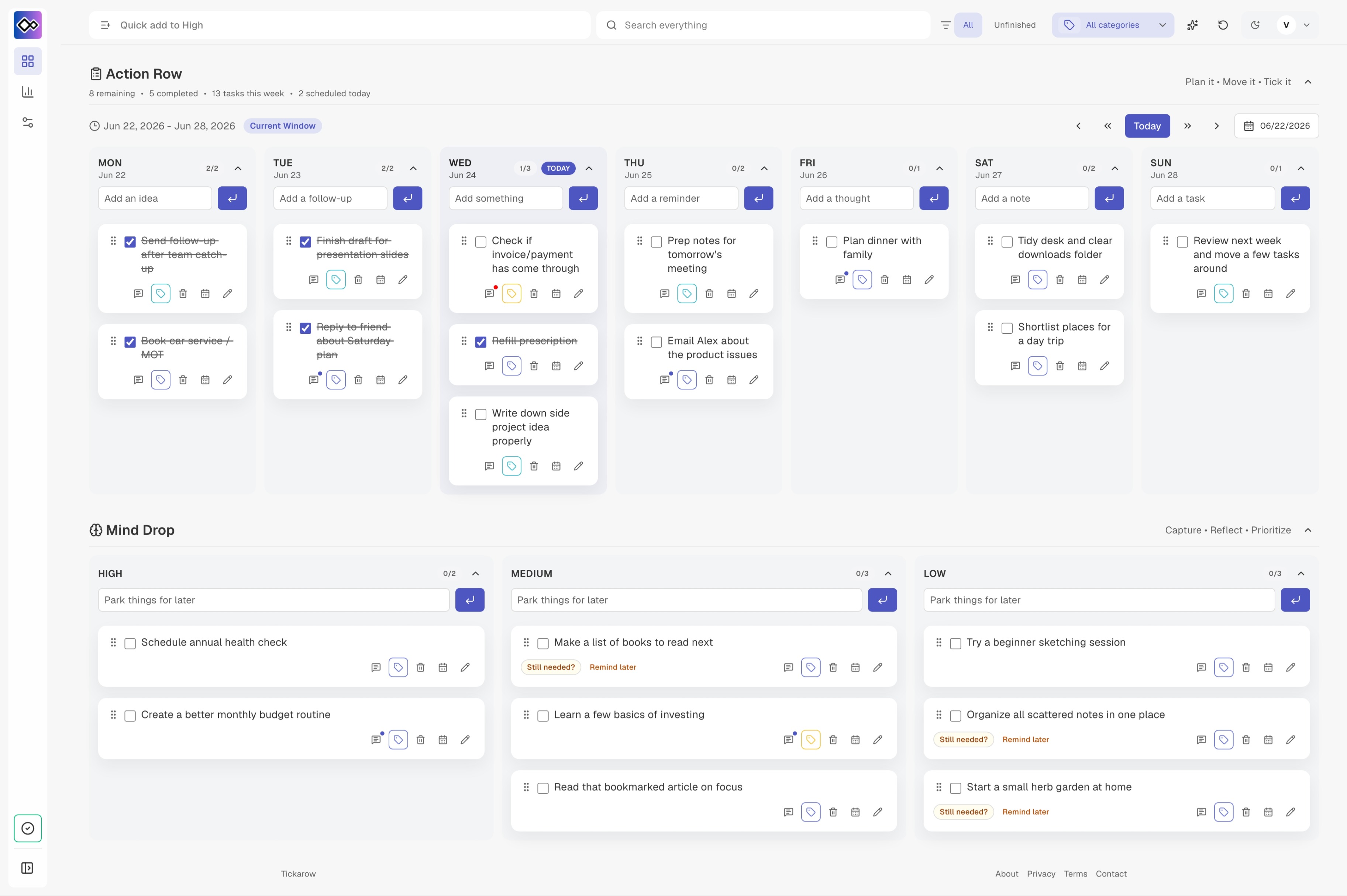
Tickarow gives you one calm personal task management surface for the work you need to remember, move, prioritise, and act on.
Quickly add work when it arrives, even before you know where it belongs.
Plan across a rolling 7-day board while keeping today’s work clear.
Drag tasks between days, parking buckets, and priorities as the day shifts.
Tasks arrive through chats, calls, meetings, and passing comments — each one small, but together they turn into mental clutter. Before you know it, your work is spread across memory, messages, and scraps of notes.
Tickarow gives you a calm place to unload it all: capture quickly, organise when you’re ready, and keep the week visible without overwhelm.
Less remembering. Less rewriting. Less searching. More visible work.
Action Row keeps your near-term work visible in a rolling 7-day board. Add tasks directly to a day, move them when plans change, and use today highlighting to stay anchored.
Mind Drop gives you configurable parking buckets for work that matters, but is not ready to schedule yet. Capture the thought, keep it visible, and pull it into the week when the time is right.
Unfinished work should not disappear just because the day changed. Tickarow can bring past unfinished tasks back into today’s attention, so you do not have to manually copy or remember what slipped.
Add one lightweight note and a blocked indicator to remember why a task is waiting, who you need to chase, what changed, or what the next step is.
Search, filters, categories, unfinished mode, and Zen mode help you reduce noise without losing the shape of your work.
Tickarow is designed so you can start quickly without account friction. Use guest mode locally in your browser, then sign in when you want sync across devices.
Try the board before committing to sign-in.
Keep working with local browser storage when connectivity is limited.
Sign in with Google when you want continuity across devices.
Choose local-only use first, then add sync only when it helps.
No. Tickarow is designed for personal execution and follow-through. It helps you manage your own tasks, notes, follow-ups, and priorities without creating a full project-management process.
No. You can start in guest mode using local browser storage. Sign in when you want sync across devices.
Tickarow is offline-friendly through local browser storage. You can keep using your local board even when connectivity is limited. Sync features depend on connection availability.
Tickarow uses local browser storage for guest mode and signed-in storage for sync. Avoid placing highly sensitive information in a personal task app.
Tickarow is for professionals who collect work from meetings, calls, chats, notes, and shifting priorities — and want a calm way to turn that work into visible action.
Start with a local board in your browser.
Built for your own notes, follow-ups, and task flow.
A calm surface without workflows, assignees, or admin overhead.
Designed for planning with enough space to see and move work.
Ready when your next note becomes a task
Your work will keep moving. Your board should help you move with it.
Try Tickarow No pricing wall. No heavy setup. Start with your own board.